May 21, 2026
Agent Versioning lets you manage multiple versions of the same AI agent - without creating duplicates.
Instead of copying agents like agent_v1, agent_v2, or agent_test_final, SubVerse AI now allows you to track every change as a version under a single agent. You can roll back instantly, keep older versions active, and even trigger specific versions via API - all while multiple users collaborate seamlessly on the same agent.
Why Did We Build Agent Versioning?
Before versioning, most teams followed an inefficient workaround:
SupportAgent_Prod
SupportAgent_Prod_v2
SupportAgent_Prod_final
SupportAgent_Prod_final_v3
This created problems:
No clear idea which agent was live
Hard to revert small changes
Confusion when multiple teammates edited agents
Duplicate agents cluttering dashboards and APIs
Agent Versioning replaces this entirely.
You now have one agent, many versions - clearly tracked, named, and recoverable.
What Is Agent Versioning?
Agent Versioning allows you to:
Save every meaningful configuration change as a version
Keep older versions available without duplication
Set one version as DEFAULT (used in production)
Roll back instantly if needed
Reference specific versions via API
Collaborate safely with multiple users on the same agent
All versions belong to the same agent, not separate copies.
Key Benefits of Agent Versioning
1. No More Duplicate Agents
You no longer need to create copies just to preserve an older setup.
Small tweak? Save a new version.
Want the old behavior? Switch the default.
Testing something risky? Keep it as a draft.
Everything stays under one agent identity.
2. Keep Old Versions Without Fear
Sometimes you want to:
Try a new prompt
Change call flow logic
Update knowledge base settings
But still keep the older version available.
With versioning:
Older versions remain intact
You can switch back instantly
No reconfiguration or rebuilding required
3. Trigger Specific Agent Versions via API
Agent Versioning isn’t just a UI feature.
The API allows you to trigger agents by version, for example:
Use the DEFAULT version in production
Route internal tests to a specific version
Gradually migrate traffic between versions
This enables clean experimentation without breaking live flows.
4. Built for Teams, Not Individuals
When multiple users work on the same agent:
One person changing prompts
Another adjusting voice or call settings
Someone else testing knowledge updates
Versioning ensures:
Changes are never silently overwritten
Everyone knows which version is live
Drafts don’t affect production
This makes collaboration predictable and safe.
Agent Version History (UI Overview)
Each agent now has a dedicated Agent Version History panel.
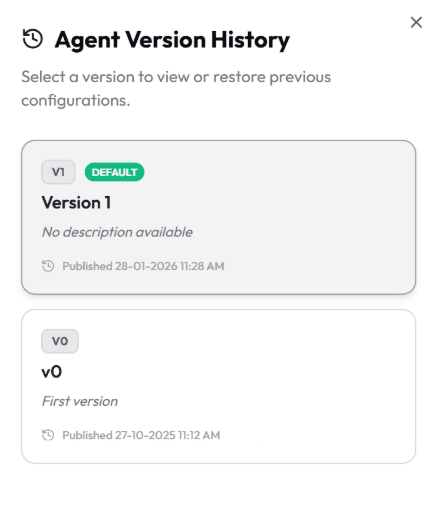
From here, you can:
View the latest versions with publish dates
See version numbers and descriptions
Identify the DEFAULT version
Load any version into the editor
Change the default version if required
Versions are sorted by publish date for clarity.
Drafts vs Published Versions
Agent Versioning clearly separates experimentation from production.
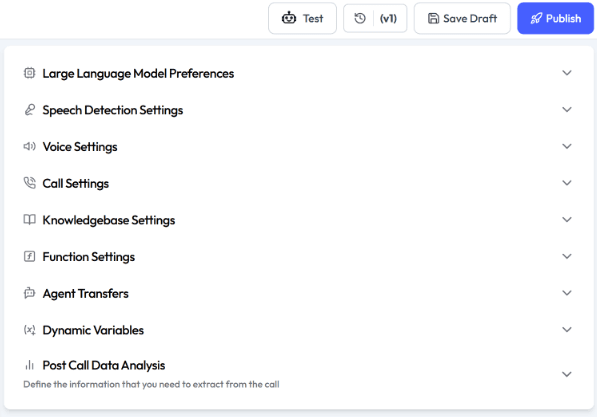
Save → creates a draft version
Save & Publish → creates or updates a published version
Option to mark any version as DEFAULT
Visual indicators help you instantly see:
Current active version
Unsaved changes
Draft vs published state
How to Use Agent Versioning (Quick Guide)
Step 1: Open an existing agent
Step 2: Make changes to prompts, settings, or flows
Step 3: Click Save to store as a draft
Step 4: Click Save & Publish when ready
Step 5: Name the version and optionally mark it as DEFAULT
That’s it. No new agents. No duplication.
Start Using Agent Versioning Today
If you’ve ever created agent_final_v2_revised, this feature is for you. If you’d like help setting up versioning best practices for your team, reach out - we’re happy to help you design a safe rollout strategy.
More Insights


