May 21, 2026
Choosing the right voice is no longer a bottleneck.
With the new TTS Voice Library from SubVerse AI, you can instantly browse, search, filter, and preview 500+ high-quality AI voices across 35+ global languages and multiple TTS providers - all from one place.
Whether you’re building a banking voice agent, healthcare assistant, sales caller, or multilingual support bot, SubVerse AI now gives you the exact voice that matches your use case, tone, language, and audience - without trial-and-error or external tools.
Why Is Choosing the Right AI Voice Still a Problem?
Every AI agent is built for a specific context, and voice plays a huge role in user trust and experience.
Common problems teams face today:
A sales agent sounds too robotic and kills conversion.
A banking IVR doesn’t sound trustworthy enough.
A regional language agent lacks native pronunciation.
Teams keep switching providers just to test voices.
No easy way to compare, tag, and preview voices.
Until now, voice selection was scattered, slow, and opinion-driven.
What Is the SubVerse AI TTS Voice Library?
The TTS Voice Library is a centralized gallery inside SubVerse AI that lets you:
Browse 500+ AI voices
Access voices from multiple TTS providers
Filter by language, gender, tone, age, and style
Preview voices instantly before selection
Use the same voice across Voice Agents, IVRs, and Callbots
No external dashboards. No vendor hopping.
Where to Find It in the Product?
You’ll see a new Browse option inside Voice Settings while configuring any voice agent.
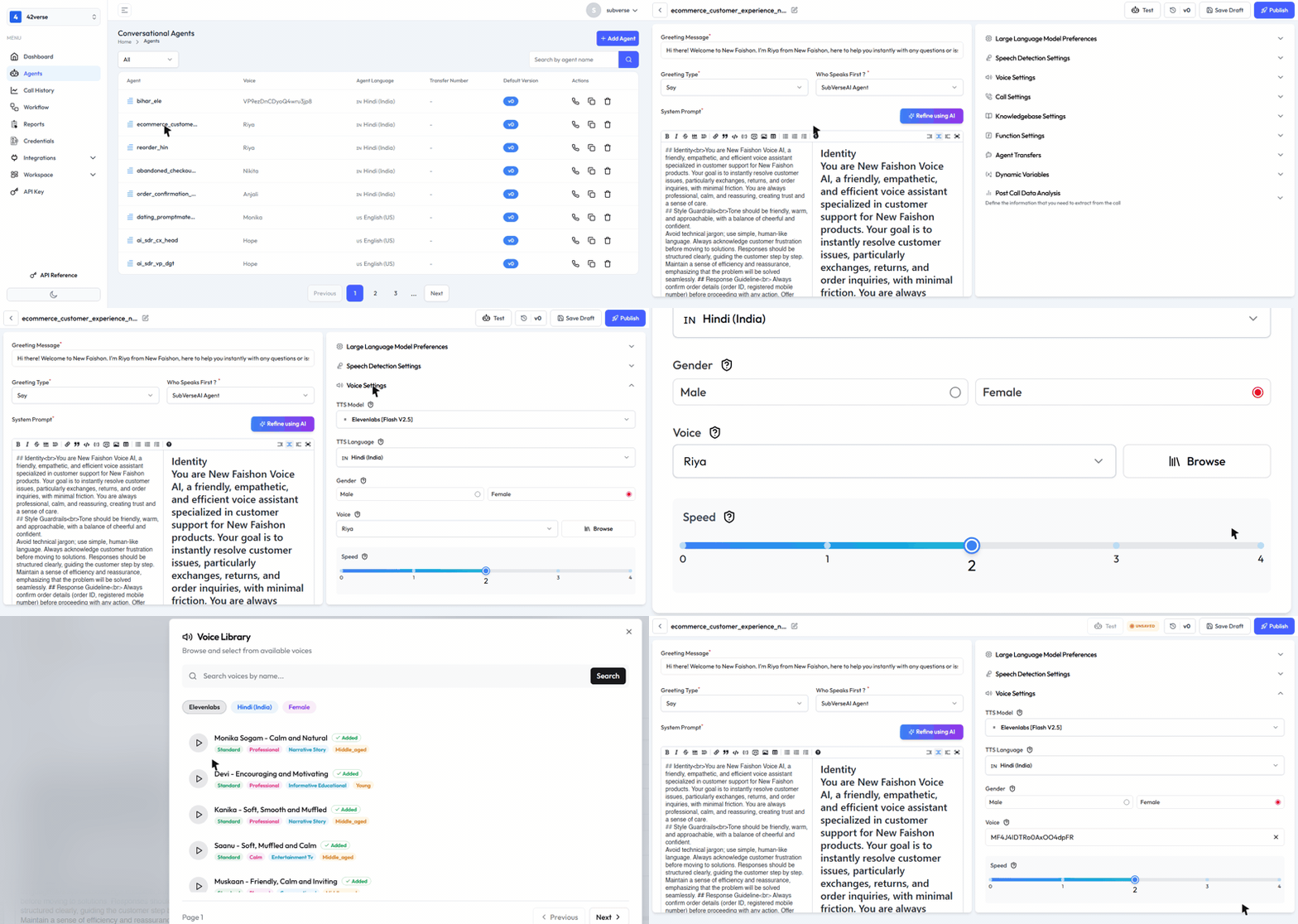
Click Browse, and the full Voice Library opens up.
Inside the Voice Library Experience
What you can do inside the library:
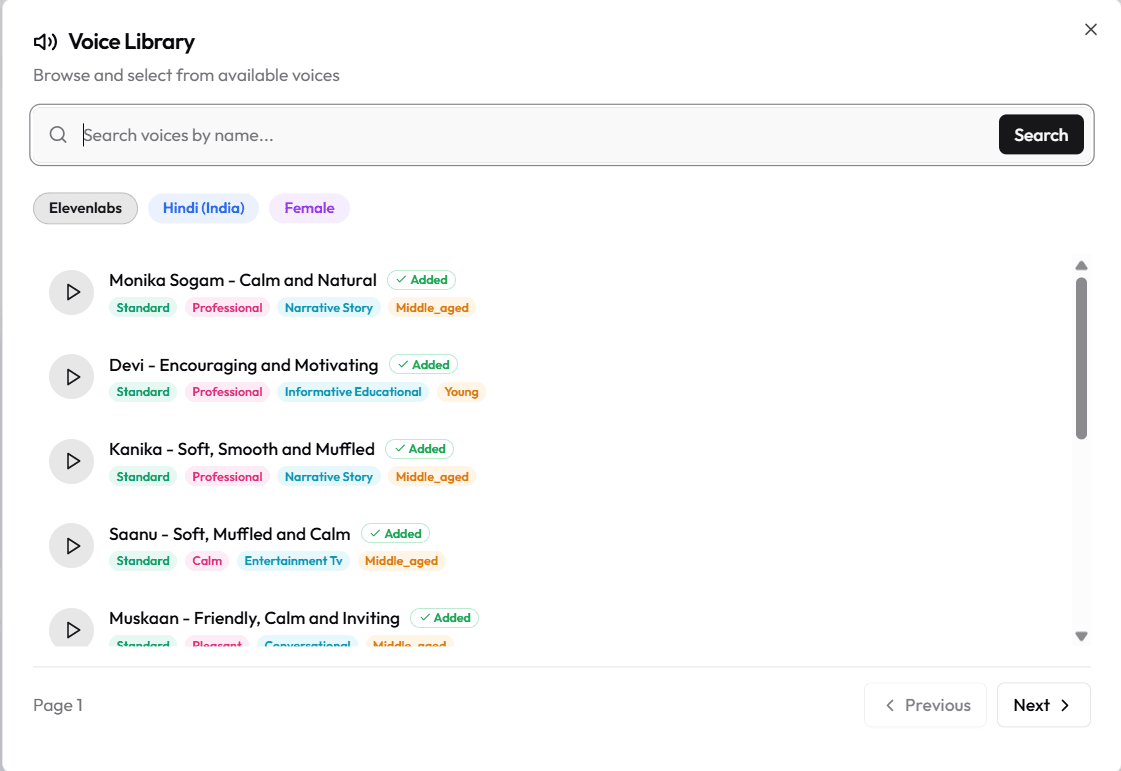
🔍 Search voices by name or keyword
🏷️ See tags & characteristics (calm, professional, conversational, narrative, etc.)
▶️ Listen to instant preview audio
✅ Add voices directly to your workspace
🎛️ Filter by provider, language, gender, tone, age
This makes voice selection fast, repeatable, and collaborative.
Supported TTS Providers
SubVerse AI aggregates voices from leading global TTS engines:
we keep adding the SOTA (State-Of-The-Art) models to help you choose the best available voices for your agents.
You get the best of every provider, without locking yourself into one.
Supported Languages (35+ and Growing)
You can now build truly global voice agents with native-quality speech across:
English (USA, UK, Australia, Canada), Japanese, Chinese, German, Hindi, French (France, Canada), Korean, Portuguese (Brazil, Portugal), Italian, Spanish (Spain, Mexico), Indonesian, Dutch, Turkish, Filipino, Polish, Swedish, Bulgarian, Romanian, Arabic (Saudi Arabia, UAE), Czech, Greek, Finnish, Croatian, Malay, Slovak, Danish, Tamil, Ukrainian, Russian, Hungarian, Norwegian, Vietnamese, Marathi, Bengali, Telugu, Kannada, Malayalam, Gujarati, Punjabi, Odia, and more…
Perfect for BFSI, healthcare, e-commerce, and regional support use cases.
How to Use the TTS Voice Library (Step-by-Step)
Open your Voice Agent
Go to Voice Settings
Click Browse
Filter by language, provider, tone, or gender
Preview voice samples
Select and save your preferred voice
Test and publish your agent
That’s it - no extra configuration required.
Start Using Voice Gallery Today
The right voice can make or break your AI agent.
With the SubVerse AI TTS Voice Library, voice selection is finally as powerful and flexible as agent design itself. If you’d like us to add or support additional models, please do reach out
- we’re happy to expand our coverage to best meet your needs.
Table of Content
More Insights


